Web Portal Panel Customization
Introduction
The panel configuration depends on the backend system and the connector. This page describes the configuration of the Web Portal panel.
The Web Portal panel comes pre-configured and is ready to use. By changing the panel.json for it you can decide which metadata can be added to shared files.
The default configuration of the Web Portal panel can be found in the following directory:
/opt/seal/seal-operator-webportal/lib/defaultConfig/
It consists of three files:
-
settings.jsonfor fields displayed when creating shares: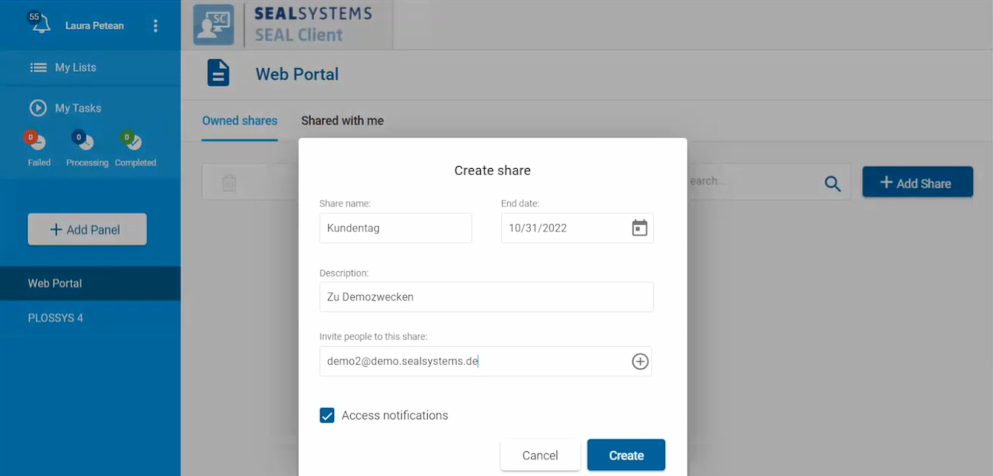
-
public-settings.jsonto use instead ofsettings.jsonif the public access option is enabled. For more information, refer to Enable Public Link Access to Shares.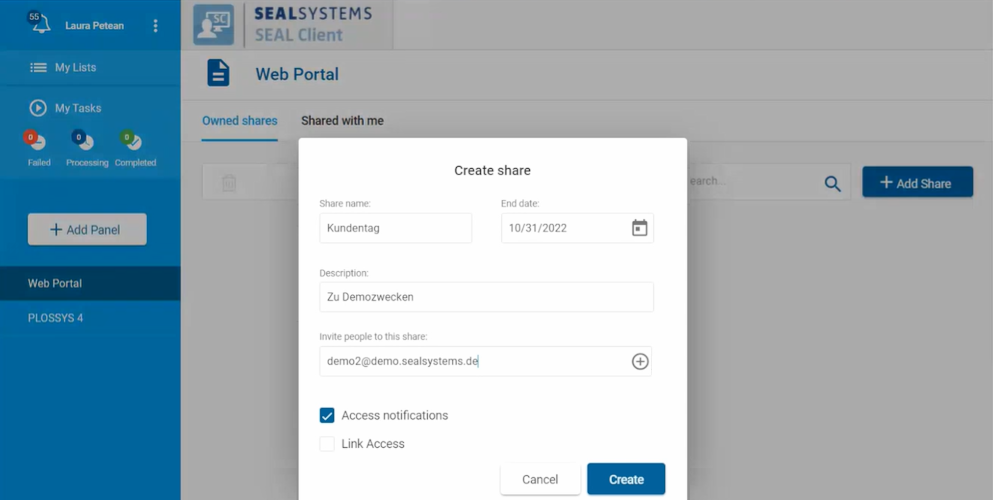
-
panel.jsonfor metadata fields displayed for shared files: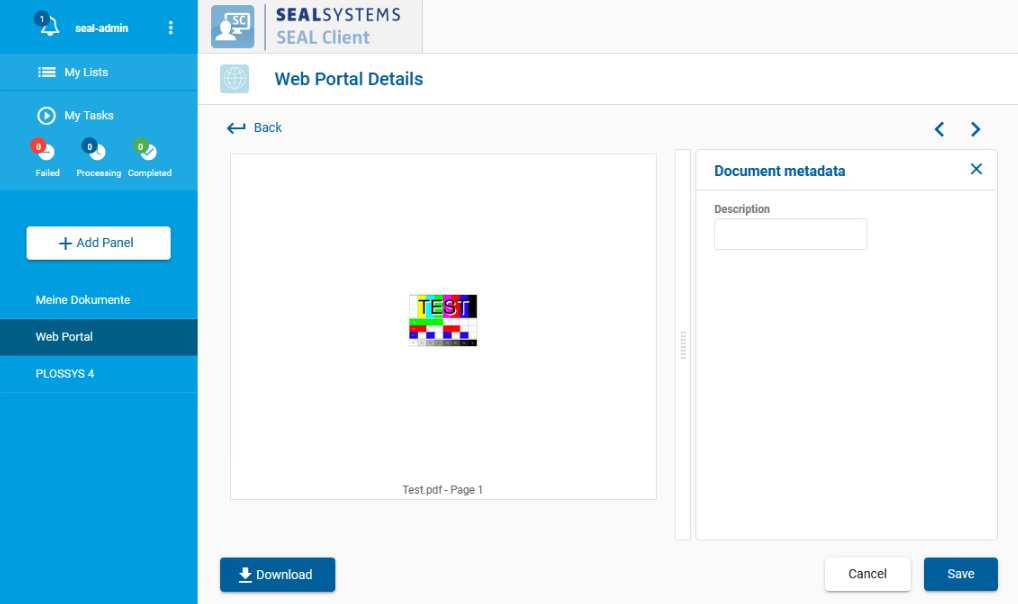


Create Custom Configuration Files
To prevent your settings from being overwritten by an update, create a customer directory for your custom configuration. Adding the customer name to the file name is also recommended. Finally, the custom configuration files need to be specified in the corresponding keys DEFAULT_WEBPORTAL_PANEL and DEFAULT_WEBPORTAL_SCHEMA.
Step-by-step instructions:
-
Copy the default configuration files to a customer directory with a customized name:
cp /opt/seal/seal-operator-webportal/lib/defaultConfig/panel.json <customer_dir>/panel-<customer_name>.jsoncp /opt/seal/seal-operator-webportal/lib/defaultConfig/settings.json <customer_dir>/settings-<customer_name>.jsonHint - public access
If
ALLOW_SHARED_ENTRIESis set totrue, copypublic-settings.jsoninstead ofsettings.json. The Web Portal connector uses only one of the two files.cp /opt/seal/seal-operator-webportal/lib/defaultConfig/public-settings.json <customer_dir>/settings-<customer_name>.json -
Export the complete configuration of SEAL Operator from Consul to a YAML file. This ensures that you edit the current configuration.
operator config export <filename>.yml --insecure -
Edit the exported file
<filename>.yml. -
In the
envsection, specify the following additional keys for theseal-operator-webportalservice in theoperator-webportalsection:-
DEFAULT_WEBPORTAL_PANEL: optional, path to the JSON file containing the fields and default values for metadata fields displayed for single files -
DEFAULT_WEBPORTAL_SCHEMA: optional, path to the JSON file containing the fields and default values available for shares
env:
  service:
  ...
    operator-webportal:
      tag:
        any:
          DEFAULT_WEBPORTAL_PANEL: <customer_dir>/panel-<customer_name>.json
          DEFAULT_WEBPORTAL_SCHEMA: <customer_dir>/settings-<customer_name>.json
  ...
Literature - keys
For further information about available keys, refer to the Key Reference.
-
-
Save the
<filename>.ymlfile. -
Re-import the file to Consul.
operator config import <filename>.yml --insecure -
Check the imported value for
DEFAULT_WEBPORTAL_PANEL:operator config get DEFAULT_WEBPORTAL_PANEL --service operator-webportal --insecure
Change Configuration
The panel configuration files panel.json and settings.json have similar structures.
Caution - JSON structure
Pay attention to keeping the JSON structure in the panel configuration files! For further information, refer to the JSON Schema.
Hint - JSON syntax check and file encoding
With online validation tools such as https://jsonlint.com/ you can check the syntax of your JSON file. However, the validation tools are not able to check if the semantics are correct.
Make sure the configuration files are encoded in UTF. Otherwise, special characters are not displayed correctly. HTML entities are not supported.
Use Version ID and Package Number
The panel configuration files are customer-specific. For this, using a version ID and a package number makes sense. The keys version and package are available for this purpose.
{
  "name": "Web Portal",
  "type": "webportal",
  "pid": "8376eb11-68e7-49c5-af60-5d46cb102304",
  "version": "$Id: $",
  "package": "$Package: $",
  ...
}
Restart the Services
After changing the configuration files, restart the following services:
-
seal-operator-webportal -
seal-operator-server
operator service start seal-operator-webportal seal-operator-server
Examples
Example - default panel.json
[
    {
        "name": "Web Portal",
        "type": "webportal",
        "pid": "8376eb11-68e7-49c5-af60-5d46cb102304",
        "json_schema": {
            "$schema": "http://json-schema.org/schema#",
            "type": "object",
            "properties": {
                "description": {
                    "type": "string",
                    "description": {
                        "de": "Beschreibung",
                        "en": "Description"
                    }
                }
            },
            "fieldsets": [
                {
                    "fields": [
                        "description"
                    ]
                }
            ]
        },
        "details_view": {
            "custom_tools": [],
            "restricted_fields": [],
            "preview_page_count": 3,
            "hide_preview_actions": true
        }
    }
]

Example - panel.json with grouped option fields
[
    {
        "name": "Web Portal",
        "type": "webportal",
        "pid": "8376eb11-68e7-49c5-af60-5d46cb102304",
        "json_schema": {
            "$schema": "http://json-schema.org/schema#",
            "type": "object",
            "properties": {
                "description": {
                    "type": "string",
                    "description": {
                        "de": "Beschreibung",
                        "en": "Description"
                    }
                },
                "due_date": {
                    "type": "string",
                    "description": {
                        "de": "Fälligkeitsdatum",
                        "en": "Due date"
                    }
                },
                "internal": {
                    "type": "string",
                    "description": {
                        "de": "Nur für internen Gebrauch",
                        "en": "For internal use only"
                    },
                    "default": "YES",
                    "widget": "select",
                    "oneOf": [
                        {
                            "enum": ["YES"],
                            "description": {
                                "de": "Ja",
                                "en": "Yes"
                            }
                        },
                        {
                            "enum": ["NO"],
                            "description": {
                                "de": "Nein",
                                "en": "No"
                            }
                        }
                    ]
                },
                "printable": {
                    "type": "string",
                    "description": {
                        "de": "Kann gedruckt werden",
                        "en": "May be printed"
                    },
                    "default": "NO",
                    "widget": "select",
                    "oneOf": [
                        {
                            "enum": ["YES"],
                            "description": {
                                "de": "Ja",
                                "en": "Yes"
                            }
                        },
                        {
                            "enum": ["NO"],
                            "description": {
                                "de": "Nein",
                                "en": "No"
                            }
                        }
                    ]
                }
            },
            "fieldsets": [
                {
                    "title": {"de": "Allgemein", "en": "General"},
                    "fields": [
                        "description",
                        "due_date"
                    ]
                },
                {
                    "title": {"de": "Geheimhaltung", "en": "Security"},
                    "fields": [
                        "internal",
                        "printable"
                    ]
                }
            ]
        },
        "details_view": {
            "custom_tools": [],
            "restricted_fields": [],
            "preview_page_count": 3,
            "hide_preview_actions": true
        }
    }
]
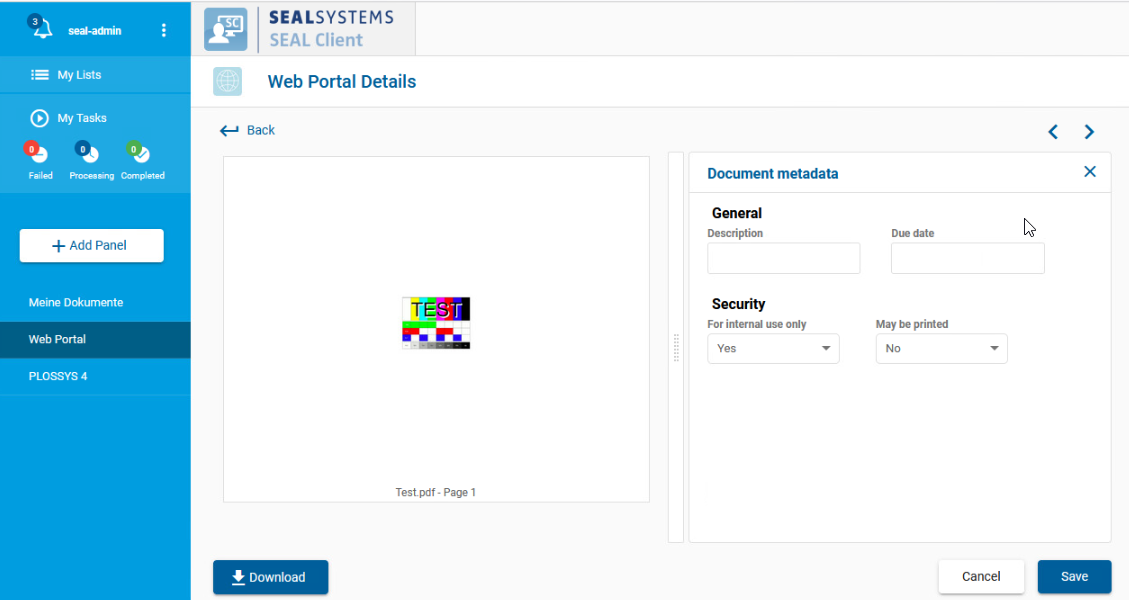
For more examples refer to Examples for Panel Customization.